
Sunday, 16 October 2016
MiXplorer v6.8.7.BETA Released for Android ~ LATEST

MiXplorer (Mix of Explorers) is a fast, smooth, beautiful, reliable and fully-featured file manager with a simple and intuitive user interface.This app has no ads, is and will always remain completely free.It supports Android 2.0+ (Eclair)
FEATURES
- Easily themable with customization option which lets you select any color you like.
- Sort, disable and enable all menu options and action buttons.
- Unlimited Tabbed browsing and Dual panel in landscape mode and Drag and Drop between panels also supported.
- Easily create Tasks to multitask Copy, Move, ... operations.
- Different various View Modes and Sorting Options for each folder separately!
- Customizable bookmarks drawer with essential file types already categorized.
- Advanced search functions.
- Custom USB OTG driver. FAT32 (R/W), exFat(R/W), NTFS (R).
- Html viewer which supports MHT, Markdown, AXml and ....
- eBook reader which supports PDF, Epub, Xps, Cbz and multipage Tiff images.
- Export/Import all preferences and bookmarks and customized skins.
- Extract and create 7z and Zip/Zip64 (splitted-encrypted), TAR, TAR.GZ, TAR.BZ2, GZIP, BZIP2
- Extract RAR/RAR5 (splitted-encrypted), XZ, APM, CAB, ISO, ARJ, AR, LZH, LHA, CHM, MSI, WIM, Z, CPIO, RPM, DEB, NSIS, LZMA, NTFS, FAT, VHD, MBR, SWM, MSLZ, CramFS, Dmg, ELF, MachO, Mub, PE, Split, Xar, Z, Udf, HFS, SquashFS, PPMD.
- All your cloud storage needs accessible from one single app. Choose from 20 providers:
- Amazon CloudDrive, Mega.co.nz, Mail.ru, Dropbox, Box, Yandex, HiDrive, Baidu, Mediafire, Kuaipan, Kanbox, IDrive, Hubic, 4Sync, Google Drive, Meo, OneDrive, pCloud, SugarSync, VDisk.
+ clouds which support webdav like (Yandex.ru, OwnCloud, MyDrive.ch, DriveHQ, CloudMe, CloudSafe, ...).
- Modifying zip files.
- Root access for all advanced operations.
- User and System app management with data backup ability for rooted devices.
- EncFS volumes supported for all storages.
- File encryption and decryption using Aescrypt file format.
- FTP/HTTP Server built in + TCP server to receive files from other devices using MiX (Send-to option).
- MP3 Tag Editor.
- Built-in Image Viewer (it supports GIF animation and large images).
- Built-in Media Player + VLC codecs add-on.
- Powerful Text Editor.
- SAMBA, FTP, SFTP, WEBDAV, BLUETOOTH supported as well.
- And many more awesome features for you to explore!
- Sort, disable and enable all menu options and action buttons.
- Unlimited Tabbed browsing and Dual panel in landscape mode and Drag and Drop between panels also supported.
- Easily create Tasks to multitask Copy, Move, ... operations.
- Different various View Modes and Sorting Options for each folder separately!
- Customizable bookmarks drawer with essential file types already categorized.
- Advanced search functions.
- Custom USB OTG driver. FAT32 (R/W), exFat(R/W), NTFS (R).
- Html viewer which supports MHT, Markdown, AXml and ....
- eBook reader which supports PDF, Epub, Xps, Cbz and multipage Tiff images.
- Export/Import all preferences and bookmarks and customized skins.
- Extract and create 7z and Zip/Zip64 (splitted-encrypted), TAR, TAR.GZ, TAR.BZ2, GZIP, BZIP2
- Extract RAR/RAR5 (splitted-encrypted), XZ, APM, CAB, ISO, ARJ, AR, LZH, LHA, CHM, MSI, WIM, Z, CPIO, RPM, DEB, NSIS, LZMA, NTFS, FAT, VHD, MBR, SWM, MSLZ, CramFS, Dmg, ELF, MachO, Mub, PE, Split, Xar, Z, Udf, HFS, SquashFS, PPMD.
- All your cloud storage needs accessible from one single app. Choose from 20 providers:
- Amazon CloudDrive, Mega.co.nz, Mail.ru, Dropbox, Box, Yandex, HiDrive, Baidu, Mediafire, Kuaipan, Kanbox, IDrive, Hubic, 4Sync, Google Drive, Meo, OneDrive, pCloud, SugarSync, VDisk.
+ clouds which support webdav like (Yandex.ru, OwnCloud, MyDrive.ch, DriveHQ, CloudMe, CloudSafe, ...).
- Modifying zip files.
- Root access for all advanced operations.
- User and System app management with data backup ability for rooted devices.
- EncFS volumes supported for all storages.
- File encryption and decryption using Aescrypt file format.
- FTP/HTTP Server built in + TCP server to receive files from other devices using MiX (Send-to option).
- MP3 Tag Editor.
- Built-in Image Viewer (it supports GIF animation and large images).
- Built-in Media Player + VLC codecs add-on.
- Powerful Text Editor.
- SAMBA, FTP, SFTP, WEBDAV, BLUETOOTH supported as well.
- And many more awesome features for you to explore!
SCREENSHOTS


DOWNLOAD : LINK
Google Pixel Contact and Dialer for Android Marshmallow

Ever desired to run the stock contacts and Dialer apps from android N on your android device running android marshmallow.May be not everyone including me. But if so desired there is way to run them on your device.A member from xda devlopers named Rajeev has ported it to run on any device running android marshmallow.So if you'll are still interested just follow the steps down below and you should be good to go
REQUIREMENTS
1. Rooted android device
2. Custom recovery like TWRP or CWM
3. Google_Pixel_Contact_Dialer_MM.zip linked below
4. Device running android marshmellow
5. Just a little bit of time
INSTRUCTIONS
1. Download the zip
2. Copy To Phone
3. Flash Zip through custom recovery
4. Reboot
5. Set Google Dialer as Default from Settings/App/Default
SCREENSHOTS

ORIGINAL XDA THREAD : LINK
Saturday, 15 October 2016
Button Mapper (Unreleased Version) for Android

Personalize the buttons on your phone or tablet by assigning custom actions to button presses, double clicks and long presses.
Quickly and easily access the most common functions on your phone.
A few examples of things you can do with Button Mapper:
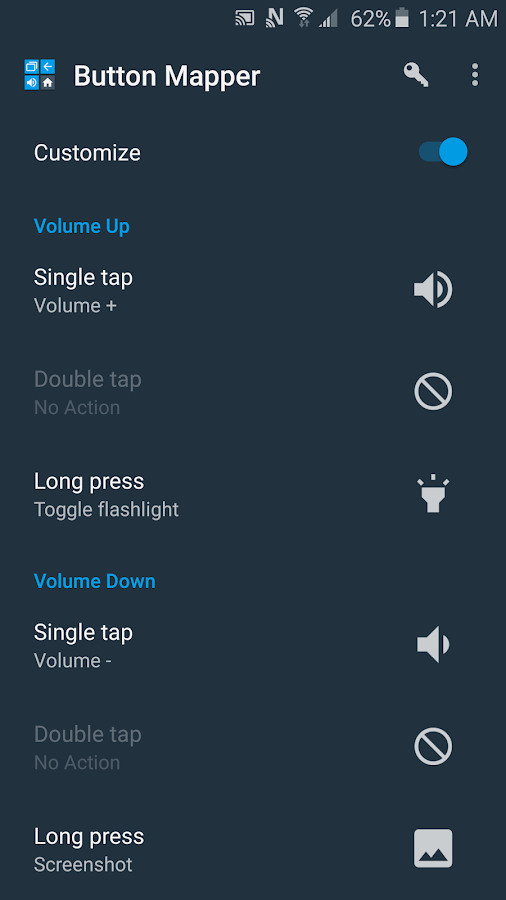
-long press volume down to toggle your flashlight
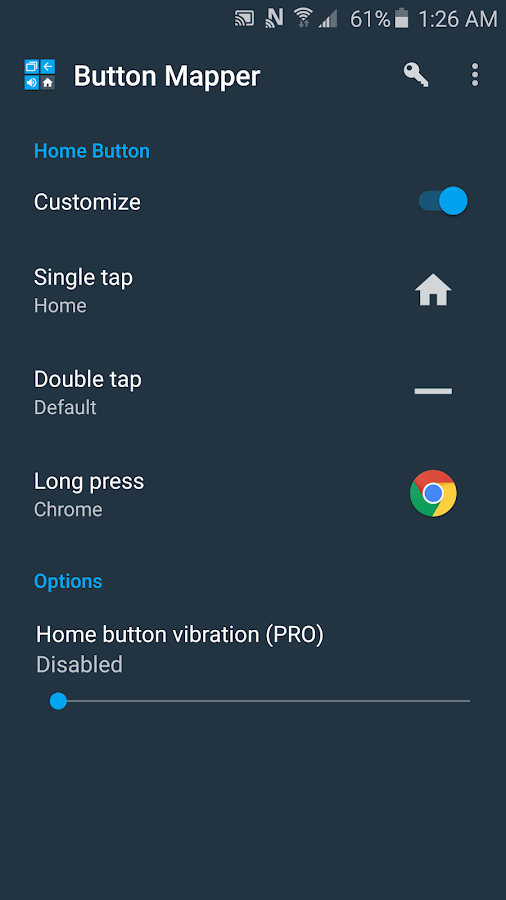
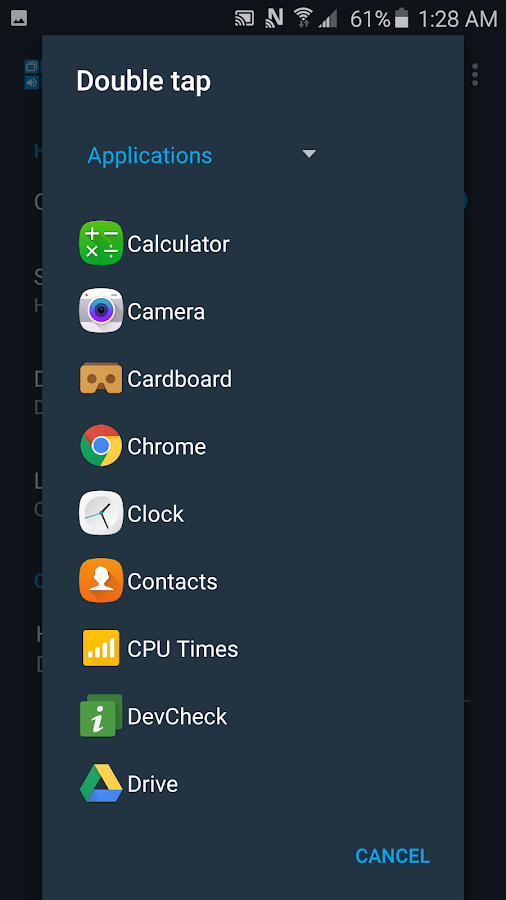
-double tap your home button to launch your favorite app
-long press your home button to turn off the screen
-long press volume up to instantly call or message your best friend
-double click the back button to see your notifications
-swap your back and recent apps keys
-use your volume buttons to adjust screen brightness
-long press home to toggle "do not disturb" mode
-press and hold the home button to quickly check your lockscreen messages, release to turn off the screen instantly
-and plenty more, the possibilities are endless
The free version allows customization of the Home button and volume buttons.
Additional features unlocked in the pro version:
-support for back button, recent apps button and camera button
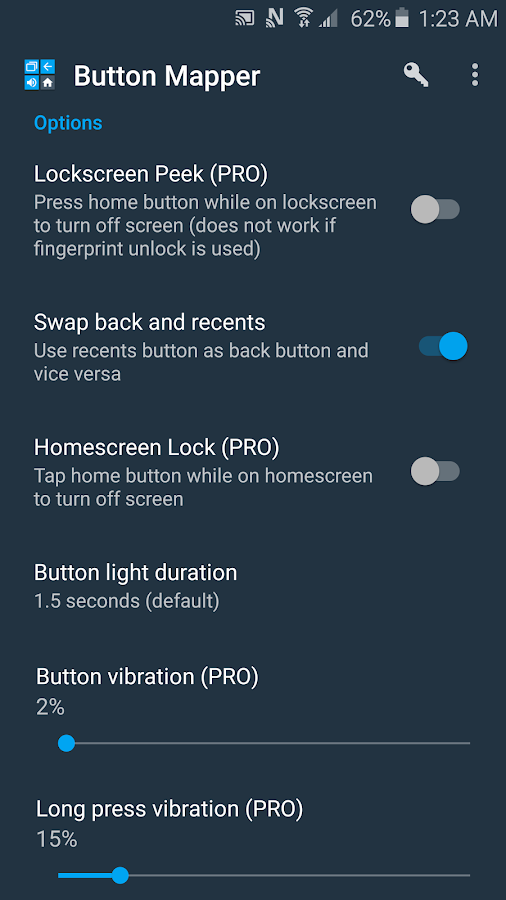
-Lockscreen peek
-Homescreen lock
-Four themes
-customization of haptic feedback (vibration) on button press and long press
Actions that can be assigned to buttons:
-launch any app or shortcut
-Disable the button
-Device default action
-Home
-Back
-Recent apps
-Turn screen off
-Toggle flashlight
-Quick settings
-Show notifications
-Power dialog
-Take screenshot
-Music: previous track, next track and play/pause
-Adjust volume
-Toggle do not disturb
-Adjust brightness
Buttons supported:
-Home
-Back (PRO version only)
-Recent apps (PRO version only)
-Volume up
-Volume down
-Camera button (PRO version only)
Special features:
-Lockscreen peek (PRO version only)
-Homescreen lock (PRO version only)
-Swap back and recent apps buttons
-Adjust button light duration on Samsung Galaxy devices (Lollipop and older)
-Adjust button vibration on Samsung Galaxy devices (PRO version only, Lollipop and older)
WHAT'S NEW
- Beta 10
SCREENSHOTS
DOWNLOAD : LINK
PLAYSTORE : LINK
Thursday, 13 October 2016
Nougat CM ~ Android 7.0 Inspired CM Theme

This is a new CM theme inspired by the latest android version 7.0 Nougat.
REQUIREMENTS
All custom ROMs including CyanogenMod or others based on CyanogenMod AND having the Theme Engine supported.
What's themed?
- SystemUI - Notifications, QS header, Volume Panels
- Settings
- Phone/Dialer
- Contacts
- Calculator (AOSP,Google)
- Trebuchet, Launcher3, Google Now Launchers
- Navigation Bar
- Nougat wallpaper
- Nougat Styled flat notifications
- And a few more things here and there...
CHANGELOGS
1. Fixed CM File Manager background (previously dark)
2. Fixed Wallpaper not displayed in CM Theme chooser
3. Fixed version code
4. Improved Navigation Bar
5. Improved Launcher 'All Apps' icons
6. New Wallpaper
7. New bootanimation (replaced with new Nougat CM themed one)
8. New App icon
9. Reduced .apk file size
SCREENSHOTS


DOWNLOAD [LATEST] : LINK
OLDER VERSIONS : CM 1.1 CM 1.0
Wednesday, 12 October 2016
How to install Google Assistant for devices running Android Marshmallow

The new much awaited Google assistant will be pixel specific only. But developers have already managed to get assistant on any nougat phone by editing the build.prop. But users have reported that camera and some other apps aren't working properly.
A xda developer named ~ ANIKETultimate ~ has figured out a way to use Google Assistant on any device running Android Marshmallow. The best part is that you wont require any root permissions or build.prop edits, So lets get started
Disclaimer : Me or the ANIKETultimate is not responsible if any shit happens to you android device. Take your own responsibility so this one.But will be happy to help if any bullshit occurs to your device
WHAT WORKS
- Voice recognition
- Chats
- Navigation etc.
WHAT DOES NOT WORK FOR NOW
- The assistant settings page is not opening
- The "OK Google" hotword detection is not working. The App crashes if I open the "hotword detection" page in settings
REQUIREMENTS
- apktool (make sure you have set it up properly)
- A smali editor ( Notepad++ for Windows, I used kate on Linux)
- patience
- Android build tools (adb and zipalign)
1. First we need the Google apk. Make sure you have upgraded to the latest ( mine was 6.6.14.21). Copy the file to your PC. Name it Google.apk
2. Open up a terminal in Linux (in Windows, navigate to the folder where apktool is located, and shift+right click on a blank space and click "open command prompt here"). If you're on Linux, make sure apktool is in your PATH.
Type
Code:
apktool d Google.apk
3. Open Google/smali/com/google/android/apps/gsa/assistant/a/e.smali file with your preferred editor.
4. Look for a method called pa() like this-
Code:
.method public static pa()Z
    .locals 3

    .prologue
    const/4 v0, 0x0

    .line 98
    invoke-static {}, Lcom/google/android/libraries/e/a/a;->aN()Z

    move-result v1

    .line 2191
............
Code:
const/4 v0, 0x0
Code:
const/4 v0, 0x1
If you can't find them in the path I provided, then look for something like this "ro.opa.eligible_device" inside an "if-neq" or "if-eqz". If you find this, then that is probably the required method.
5. Return to the root directory (where the Google directory is located) and type
Code:
apktool b Google
7. Open the original apk with a zip viewer (winrar or 7zip, I used ark). Extract the META-INF folder to the directory.
8. Open the modified apk with the zip viewer . Don't extract it. Just drag and drop the META-INF folder on the apk. Make sure you have the compression option as "store"
9. Now install this app. Some people reported that it does not install from the device. I never tried to install it from my phone. I actually installed it via adb and it worked. type-
Code:
adb install -r Google.apk
SCREENSHOTS


DON'T WANT TO GO THROUGH ALL THE HASSLE OF UNZIPPING AND OTHER CRAP HERE IS THE APK WHICH IS MODDED BY THE ANIKETultimate HIMSELF : LINK
NOTE : if the above apk does not install, could you try running 'pm install -r Google.apk' from a terminal on your phone, and send me the output?
Tuesday, 11 October 2016
How to install Sony Apps directly from Play Store

By flashing the below zip you will be able to install Sony apps directly from the google playstore,Which was not possible before as these apps were exclusively available only for Sony devices. Just follow the below instructions and you should be good to go,You will require a CUSTOM RECOVERY like TWRP or CWM
INSTRUCTIONS
1. Take nandroid backup.
2. Download SonyPlayStoreDuel.zip
2. Download SonyPlayStoreDuel.zip
3. Transfer it to phone.
4. Flash it via recovery
5. Reboot your phone.
6. Open Play store and search for Sony
4. Flash it via recovery
5. Reboot your phone.
6. Open Play store and search for Sony
APPS AVAILABLE AFTER FLASHING THE ZIP
1. Sony Music
2. Sony Album
3. Xperia Keyboard
4. Audio Recorder
5. Lifelog
6. Alpha Clock
7. File Manager
8. Weather
9. Motion Shot
10. News Suite
11. Movie Creator
12. Walkmate
13. Smart Key
14. Video and TV SideView
15. Remote App
16. Sketch and more
TESTED ON
CM 12 ,CM 12.1 and CM 13 [CyanogenMod]
SCREENSHOTS


DOWNLOAD : LINK | MIRROR
1. Sony Music
2. Sony Album
3. Xperia Keyboard
4. Audio Recorder
5. Lifelog
6. Alpha Clock
7. File Manager
8. Weather
9. Motion Shot
10. News Suite
11. Movie Creator
12. Walkmate
13. Smart Key
14. Video and TV SideView
15. Remote App
16. Sketch and more
TESTED ON
CM 12 ,CM 12.1 and CM 13 [CyanogenMod]
SCREENSHOTS
DOWNLOAD : LINK | MIRROR
Monday, 10 October 2016
Lucky Patcher v6.2.9 for Android ~ UPDATED

Lucky Patcher is a great Android tool to remove ads, modify Permissions, bypass premium applications license verification, and more. You can use this patches to break some apps Android Market License Verification or other verification To use this application, you need a rooted device. All credits to Chelpus.
CHANGLOGS
- Added delay in two days to check for updates (to unload the update server);
- Update modded Google Play 6.9.15 for android 7 for user permission setup;
- Fix bug for Support patch;
- Update custom patches;
- Update translations;
- Bugs fixed.
for more info check out my old post : here
SCREENSHOTS

DOWNLOAD : LINK
- Added delay in two days to check for updates (to unload the update server);
- Update modded Google Play 6.9.15 for android 7 for user permission setup;
- Fix bug for Support patch;
- Update custom patches;
- Update translations;
- Bugs fixed.
for more info check out my old post : here
SCREENSHOTS
DOWNLOAD : LINK
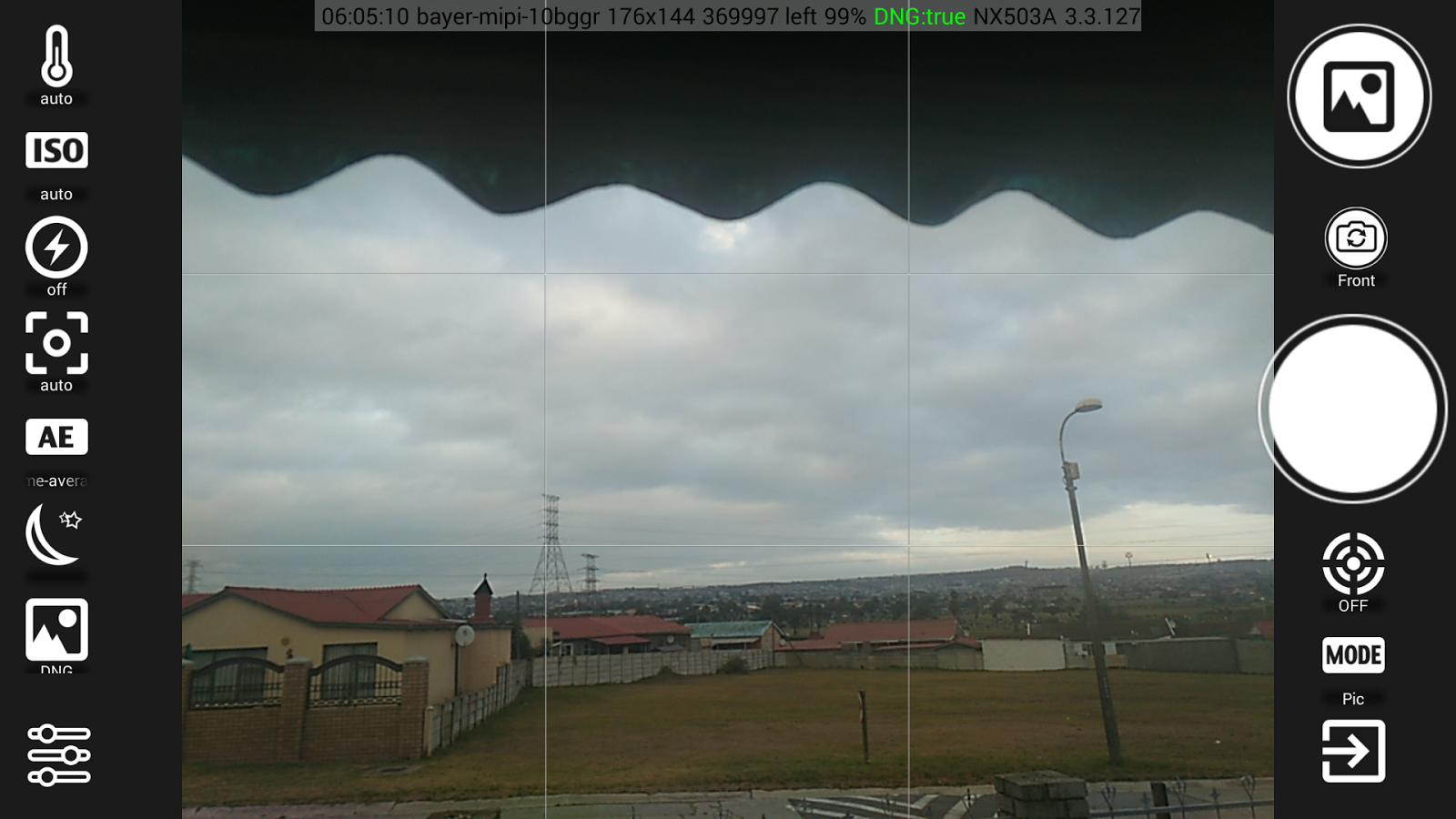
FreeDCam for Android ~ Pro Camera

FreeDCam is an OpenSource Camera App
Supported API's:
- Camera 1/ Original Android Camera api
- Camera 2 (Alpha State , Video Recording to be added)
- PlayMemories (Sony ILC WIFI Remote API)
- LG Real3D
Supported Camera 1 api Extensions.
- OMAP
- Qualcomm
- MediaTek
- Real3D for LG P92x (Optimus 3D) ,P72x (Optimus 3DMax), SU760 (Optimus 3D SK),SU870 (3DCube)
Supported Manual Modes
- Brightness +-
- Contrast + -
- Exposure + -
- Focus +
- Saturation + -
- Sharpness + -
- Shutter speed +
- Zoom + -
Supported Modes
- Flash +
- Color + -
- ISO + -
- Metering
- White Balance + -
- Scenes + -
- Focus +
- Anti Flicker + -
Scene Detection + -
- Noise Reduction + -
- Digital Image Stabilization + -
- Memory Color Enhancement +-
- Zero Shutter Lag (Must be disabled for RAW Capture) + -
Note : This app may not work on some devices.If this app works for you comment it down in the description
TESTED DEVICES
Mi4 ~ WORKING
Redmi 3S ~ WORKING BUT NOT MANUAL FOCUS
K3 Note ~ WORKING
K5 ~ WORKING BUT CANT SAVE THE IMAGE FOR SOME ODD REASON
K5 Note ~ WORKING
Redmi 2 ~ NOT WORKING
Redmi 2 Prime ~ WORKING BUT NOT MANUAL FOCUS
Moto X Play ~ NOT WORKING
SCREENSHOTS


DOWNLOAD : LINK
PLAYSTORE : LINK
Remix OS Hacked Edition/Version v3.0.202 UPDATE [32 bit and 64 bit] | THE BEST ANDROID OS FOR PC
FEATURES
1.Prerooted with SuperSU (with preupdated SU Binary)
2.Busybox Installed
3.init.d Enabled
4.Added latest update 3.0.202
5.Added CyanogenMod File Manager for Root Access
6.Added CyanogenMOD AudioFX (as many didn’t liked the COS AudioFX)
7.Gapps (Play Store and Play Services) are preinstalled (see note below)
8.Removed Bloatwares (Videos/Photos of Remix Mini etc.)
9.Two modes: Google mode for those who want play services and NoGoogle mode for those who do not want play services.
10.Added AdAway advertisements blocker
Changelog for Hacked Edition [3.0.202]
- Added CyanogenMOD 13 AudioFX
- Added CyanogenMOD 13 File Manager
- system.sfs is converted to system.img in Hacked Edition to mount it as r/w
- SuperSU v2.76 Beta added
- Added AdAway
- Added Google and NoGoogle Commands
- Enabled init.d
- Monthly updates will be there.
Changelog in RemixOS v3.0.202 by Jide
- “Black screen” issue during installation in Setup Wizard has been fixed
- Added feature to configure Ethernet connections
- Added feature to disable HDD Mount (in ‘Settings > Experimental features’)
- Wi-Fi mock issue on some gaming apps has been fixed (e.g. Asphalt 8)
- Intel Skylake CPU-related audio card issue has been fixed
- CPU usage has been improved
- Power usage has been improved
- GMS and Webview has been updated to the latest version
INSTRUCTIONS
1.Unzip
2.Open RemixOS Installation Tool
3.Select "RemixOS xXX 2016XXXX TG.iso" in iso box.
4.Select desired installation type (Hard Disk/USB)
5.Select target drive, install, and exit installer.
6.If you installed it on hard-disk , goto the RemixOS directory and delete the unformatteddata.img
7.Reboot and select RemixOS from boot menu.
1.Prerooted with SuperSU (with preupdated SU Binary)
2.Busybox Installed
3.init.d Enabled
4.Added latest update 3.0.202
5.Added CyanogenMod File Manager for Root Access
6.Added CyanogenMOD AudioFX (as many didn’t liked the COS AudioFX)
7.Gapps (Play Store and Play Services) are preinstalled (see note below)
8.Removed Bloatwares (Videos/Photos of Remix Mini etc.)
9.Two modes: Google mode for those who want play services and NoGoogle mode for those who do not want play services.
10.Added AdAway advertisements blocker
Changelog for Hacked Edition [3.0.202]
- Added CyanogenMOD 13 AudioFX
- Added CyanogenMOD 13 File Manager
- system.sfs is converted to system.img in Hacked Edition to mount it as r/w
- SuperSU v2.76 Beta added
- Added AdAway
- Added Google and NoGoogle Commands
- Enabled init.d
- Monthly updates will be there.
Changelog in RemixOS v3.0.202 by Jide
- “Black screen” issue during installation in Setup Wizard has been fixed
- Added feature to configure Ethernet connections
- Added feature to disable HDD Mount (in ‘Settings > Experimental features’)
- Wi-Fi mock issue on some gaming apps has been fixed (e.g. Asphalt 8)
- Intel Skylake CPU-related audio card issue has been fixed
- CPU usage has been improved
- Power usage has been improved
- GMS and Webview has been updated to the latest version
INSTRUCTIONS
1.Unzip
2.Open RemixOS Installation Tool
3.Select "RemixOS xXX 2016XXXX TG.iso" in iso box.
4.Select desired installation type (Hard Disk/USB)
5.Select target drive, install, and exit installer.
6.If you installed it on hard-disk , goto the RemixOS directory and delete the unformatteddata.img
7.Reboot and select RemixOS from boot menu.
Google and NoGoogle Modes
Instructions to enable your preferred Mode:
1.Open Terminal
2.Type "Google" or "NoGoogle" as per your choice without the quotes.
3.Reboot.
Instructions to enable your preferred Mode:
1.Open Terminal
2.Type "Google" or "NoGoogle" as per your choice without the quotes.
3.Reboot.
SCREENSHOT

DOWNLOAD LINKS
32 BIT : LINK
32 BIT : LINK
64 BIT : LINK
XDA FORUM : LINK
Wednesday, 28 September 2016
Lenovo VibeUI™ 3.0 Apps! for Android ~ Loiilpop and above
APPS PORTED
• Lenovo Camera ( May Crash )
• Lenovo Album
• Lenovo Launcher
• Lenovo Calculator
• Lenovo Browser ( All in chinese but if you type google.com you can browse in your language)
• Lenovo File Manger
• Lenovo Backup Tool ( All in chinese but easyliy understandable)
• Lenovo Theme Center
• Lenovo Compass
• Lenovo Sound Recorder
• Lenovo Security Center ( For arm64 Only )
• Lenovo Account ( Half english and Hlaf Chinese)
• Lenovo Music ( Port In Progress)
• Lenovo Base Libs and framework files
• Lenovo App Store ( For chinese Mates that doesn't have play store)
REQUIREMENTS
• Any device running a Lollipop/Marshmallow ROM Based on Android 5.0+
• Recovery
INSTRUCTIONS
• Download and flash Lenovo libs base first! through recovery ~ custom recovery like twrp
• Choose a method that is
- Flashable Zip file
- Install as normal APK
• Enjoy!!
SCREENSHOTS

DOWNLOAD : LINK
CREDITS : androidexpert35
USB MASS STORAGE Enabler v1.5.1 for Android ~ ROOT

This app is to enable Mass Storage Mode for mounting your Memory Card as a USB Drive in Computer from your rooted device..
It does not mount internal storage, and it will not work if your device doesn't have External Memory Card Support..
INSTRUCTIONS
1. Connect phone using USB cable to Computer or TV or DVD/Audio Player (or even to other phone with OTG) or whatever.
2. Open the 'UMS Enabler' app and press 'Enable Mass Storage' and give it root access.
(Try 3-4 times if it doesn't work the first time itself)
3. Before disconnecting USB, eject from Computer and then press 'Disconnect Mass Storage' in app.
If it doesn't work, go to Advanced Settings (from options) and manually choose the required settings, and try again.
NOTE : This will work only if there is USB Gadget & FUSE driver built-in in your kernel..
SCREENSHOTS


DOWNLOAD : LINK | MIRROR
Y Music ~ Listen music from Youtube [Save 90% data]

- Quick switch between YouTube app to play in background.
- Listen sound stream online from Youtube's video in BACKGROUND.
- Save 90% bandwidth when load only sound stream.
- Quick download/listen directly in YouTube app and Web Browser..
- DOWNLOAD Youtube's video with multi resolution or just download as audio (mp3 320kbps/webm format).
- Easy control playback eveywhere
- Download media while playing.
- Play your audio/video file as sound.
- Create offline playlist.
- Support many media codecs: m4a, webm, mp3, mp4, flv, opus,...
- Support CPUs: armeabi-v7a, arm64-v8a, mips, x86, x86_64
- Load media codec library after install, reduce apk size ~4MB
- Listen sound stream online from Youtube's video in BACKGROUND.
- Save 90% bandwidth when load only sound stream.
- Quick download/listen directly in YouTube app and Web Browser..
- DOWNLOAD Youtube's video with multi resolution or just download as audio (mp3 320kbps/webm format).
- Easy control playback eveywhere
- Download media while playing.
- Play your audio/video file as sound.
- Create offline playlist.
- Support many media codecs: m4a, webm, mp3, mp4, flv, opus,...
- Support CPUs: armeabi-v7a, arm64-v8a, mips, x86, x86_64
- Load media codec library after install, reduce apk size ~4MB
UPDATES
- [FIX] Download mp3 errors
- [UPDATE] Latest dependency libraries
SCREENSHOTS


Tuesday, 27 September 2016
cSploit for Android ~ network analysis and penetration suite

cSploit is a free/libre and open source (GPLed) Android network analysis and penetration suite which aims to be the most complete and advanced professional toolkit for IT security experts/geeks to perform network security assessments on a mobile device.
FEATURES
- Map your local network
- Fingerprint hosts' operating systems and open ports
- Add your own hosts outside the local network
- Integrated traceroute
- Integrated Metasploit framework RPCd
- Search hosts for known vulnerabilities via integrated Metasploit daemon
- Adjust exploit settings, launch, and create shell consoles on exploited systems
- More coming
- Forge TCP/UDP packets
- Perform man in the middle attacks (MITM) including:
- Image, text, and video replacement-- replace your own content on unencrypted web pages
- JavaScript injection-- add your own javascript to unencrypted web pages.
- password sniffing ( with common protocols dissection )
- Capture pcap network traffic files
- Real time traffic manipulation to replace images/text/inject into web pages
- DNS spoofing to redirect traffic to different domain
- Break existing connections
- Redirect traffic to another address
- Session Hijacking-- listen for unencrypted cookies and clone them to take Web session
REQUIREMENTS
- A ROOTED Android version 2.3 (Gingerbread) or a newer version
- The Android OS must have a BusyBox full installation with every utility installed (not the partial installation). If you do not have busybox already, you can get it here or here (note cSploit does not endorse any busybox installer, these are just two we found).
- You must install SuperSU (it will work only if you have it)
SCREENSHOTS


DOWNLOAD LINKS
RELEASE APK : LINK
PRE RELEASE APK : LINK
NIGHTY APK : LINK
Saturday, 17 September 2016
Material Design Xposed Installer ~ UPDATED

WHAT'S NEW
- Navigation drawer
- Zip downloader and installer for all Android versions!
- Import and export list of enabled/installed modules!
- Heads-up notification!
- Share module with your friends!
- Theme app as you like! (Color chooser in settings)
WHAT'S FIXED
- Scrolling while downloading causes crash thanks to @pyler
- Embedded images are not loaded
SCREENSHOTS


DOWNLOAD : LINK
[XPOSED] Android N-ify - Use features introduced in Android N on your Device!
This module allows you to use several features introduced in Android N on your Lollipop and Marshmallow device!
Note: Google hasn't released the source code for Android N yet, so I don't have a solid reference to build this module on. Every feature is based only on some screenshots and decompiled code, therefore not everything might look exactly as in the official preview and this only works on android lollipop and above
FEATURES
New notifications and quick settings
New recents design
Settings tile summaries
Quick Switch (Double-tap recents to switch to last app)
Use recents button to navigate through recents
SCREENSHOTS


DOWNLOAD : LINK
Subscribe to:
Posts
(
Atom
)